Kiki Juli Anggoro, School of Education, Walailak University, Thailand
Anggoro, K. J. (2026). Wayground Slides AI and self-regulated learning in flipped EFL classrooms. Studies in Self-Access Learning Journal, 17(2), 255–267. https://doi.org/10.37237/170207
Abstract
Flipped Classroom (FC) and Self-Regulated Learning (SRL) are inseparable. In the English as a Foreign Language (EFL) context, the interaction between the two may lead to more successful instruction. To provide effective SRL, interactive media might be essential, as they can boost students’ motivation, which is often a problem when students work on homework or pre-class tasks. In addition, teachers’ needs must also be considered. While FC benefits EFL learners, it often increases workload. Thus, finding a platform that is not only effective but also efficient is necessary. Moreover, free access can reduce financial constraints for teachers. This article presents my exploration and experience with the interactive slides on Wayground, formerly known as Quizizz. This writing also provides a comparative reflection between Wayground and other interactive presentation tools used in my teaching practice since 2020.
Keywords: AI, EFL, Flipped Classroom, Self-Regulated Learning, Wayground slides
The emergence of AI-powered technologies has expanded learning options for learners and teachers across various fields, including English as a foreign language (EFL). One popular tool is Quizizz, which has been widely used in research to support EFL learning. One notable utilization is its use for students’ self-regulated learning (SRL). Anggoro and Pratiwi (2023) highlighted the platform’s affordances in facilitating self-access EFL learning.
Since then, the platform has undergone updates and improvements. While it is still widely recognized for its interactive quizzes, Quizizz now offers additional tools that can further support both learners and teachers in promoting SRL. Of particular interest in this article is the slides or the presentation feature. Although not entirely new, it has been enhanced with AI and other functionalities. Quizizz has also been rebranded as Wayground, a change that may bring new benefits for EFL learners and teachers, especially in the context of SRL. This article draws on my experiences using Wayground in the flipped EFL classroom environment, where students’ self-access pre-class tasks play a key role in ensuring the success of the learning strategy.
Why Interactive Slides for SRL in FC
The flipped classroom (FC) is an instructional approach that reverses the conventional organization of teaching, where students first engage with instructional materials independently and then use classroom time for interactive learning activities and knowledge application (Bergmann & Sams, 2012). I have implemented FC in EFL classes since 2017. I teach at a university in Southern Thailand, where students are not often exposed to the target language, English, outside the classroom. Thus, English learning opportunities are scarce and often limited to the 2-hour class. My students’ English proficiency level usually ranges from A1 to B2. For the students in the A level, teacher support is essential both inside and outside of the classroom. Thus, I always use FC when teaching A-level groups or theory-heavy courses.
While studies (Li et al., 2022; Khasanah & Anggoro, 2022) have reported FC’s success, it can become redundant if students do not complete the pre-class tasks. Unfortunately, this is often the case, with procrastination being a major challenge (Walsh, 2024). One underlying cause may be the appeal of the materials. According to Morita & Fukuya (2023), the appeal of materials, particularly through decorative pictures, can influence student learning by attracting attention. While books, modules, and slides are rich in information, they do not always motivate students to engage in independent study. To address this, researchers and educators have explored interactive and trackable platforms designed to boost pre-class engagement. Tools such as Pear Deck (Anggoro & Khasanah, 2024) and Nearpod (Anggoro & Khasanah, 2025) have been widely adopted, and studies have demonstrated their positive effects on students’ pre-class engagement in FC environments. I have incorporated these platforms into my teaching practice since 2020.
Given these existing tools, one may question the added value of Wayground slides. I have always sought tools that are not only effective, but also efficient. In FC, teachers typically prepare two sets of materials: pre-class and in-class. While platforms like Pear Deck and Nearpod are user-friendly and provide interactive features that can attract students and streamline teacher work, they have certain limitations. For example, in the free version, Pear Deck’s student progress tracking may be limited, and Nearpod is often better suited for smaller classes.
When I first tried Wayground slides (October 2025 version), I immediately noticed the efficiency it offered. Its AI integration provides a streamlined platform that can combine both slides and quizzes while accommodating a larger number of students. During my first use, I uploaded my existing slides, and the platform automatically generated quizzes for each slide, ensuring student engagement after each topic. Additionally, Wayground is known for its animations and sound effects, which can further enhance students’ motivation to interact with the content. I will discuss this aspect in more detail in the next section.
Wayground Slides for SRL in FC
There are several factors that make Wayground slides’ free version potentially superior to the free versions of other interactive slide platforms. These include AI generation, comprehensive assignment settings, student progress tracking and reporting, and animations and sounds.
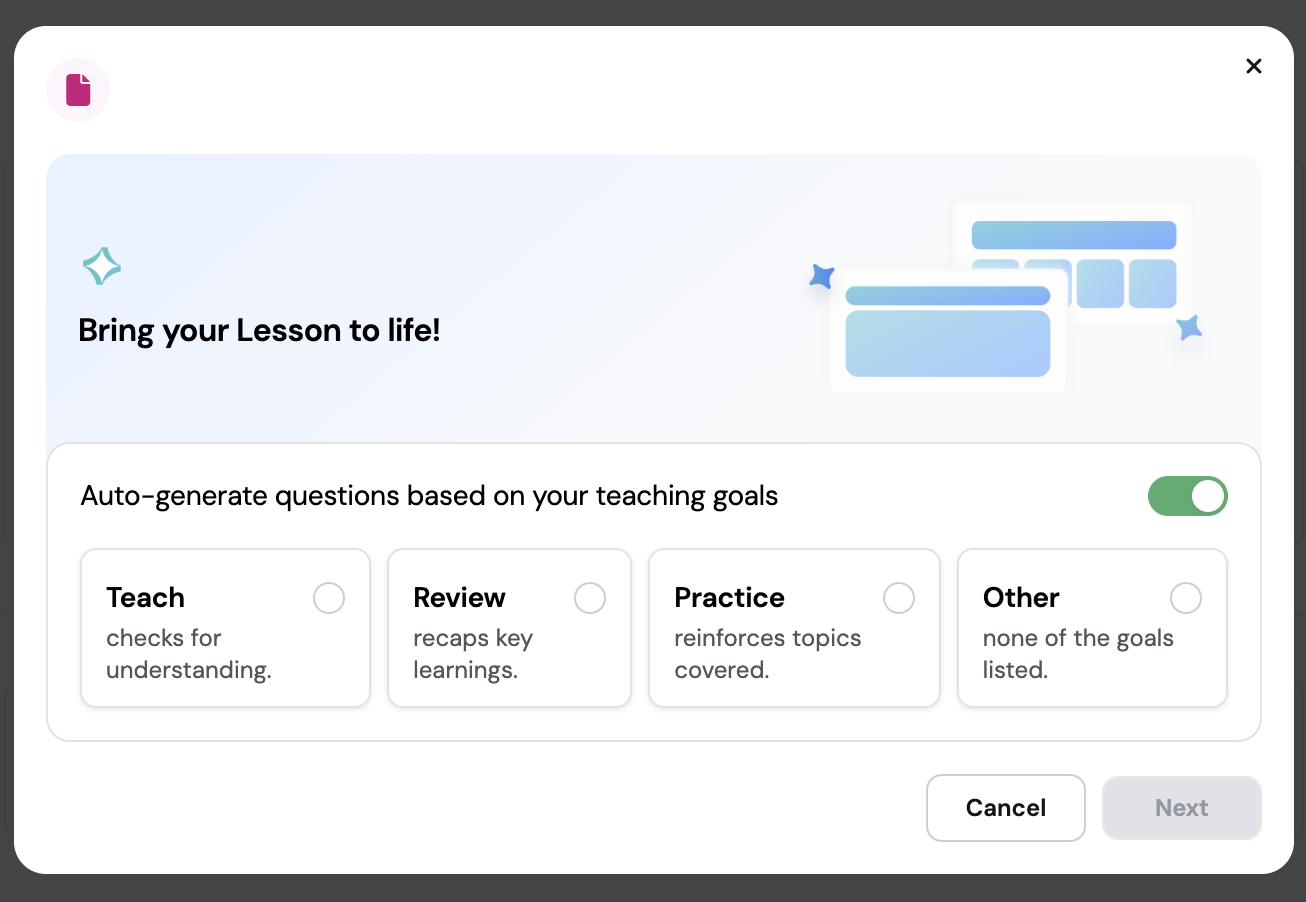
Figure 1
Wayground’s AI Generation Feature
AI Generation
The first factor is AI generation. When creating a presentation on Wayground, a teacher can either start from scratch or upload a pre-existing file from a device or Google Drive, which is similar to many other platforms. The key difference, however, comes after the slides are ready. Wayground AI can automatically generate questions tailored to the teacher’s instructional goals. Using the AI Hero feature, as shown in Figure 1, teachers can select objectives such as Teach (to check students’ understanding), Review (to recap key learnings), or Practice (to reinforce covered topics). In addition to these three, there is also an Other option, which allows the AI to scan the presentation and decide the most appropriate type of questions based on the content and context.
For example, when selecting Review, the platform generates questions from each slide in the file. The questions come in various formats, including multiple-choice, fill-in-the-blank, and open-ended (see Figure 2). Many other platforms’ AI generation is often limited to a single format, usually multiple-choice, so I was pleasantly surprised to find this variety. It gives the flexibility to design questions for different topics or even entire courses.
Figure 2
Slide on Wayground with AI-generated questions
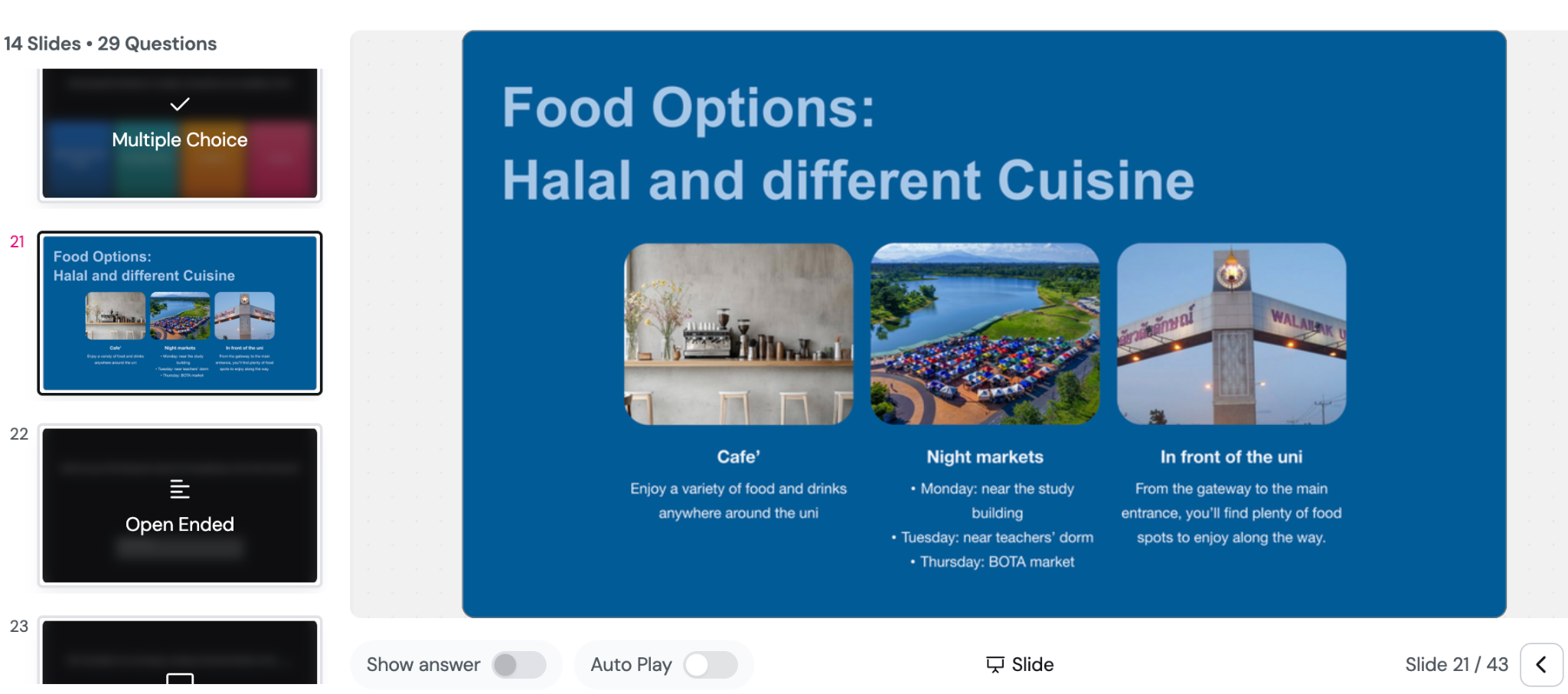
These AI-generated questions can also be edited, discarded, or supplemented. This step is crucial because it enables teachers to apply their judgment and make adjustments that better suit their students, while still benefiting from the time-saving advantages of AI. Despite this need for review, I experienced a noticeable reduction in workload and a faster workflow compared to using other interactive presentation platforms. Wayground may help address the workload challenges experienced by FC teachers, as reported by Fischer et al. (2023).
Assignment Setting
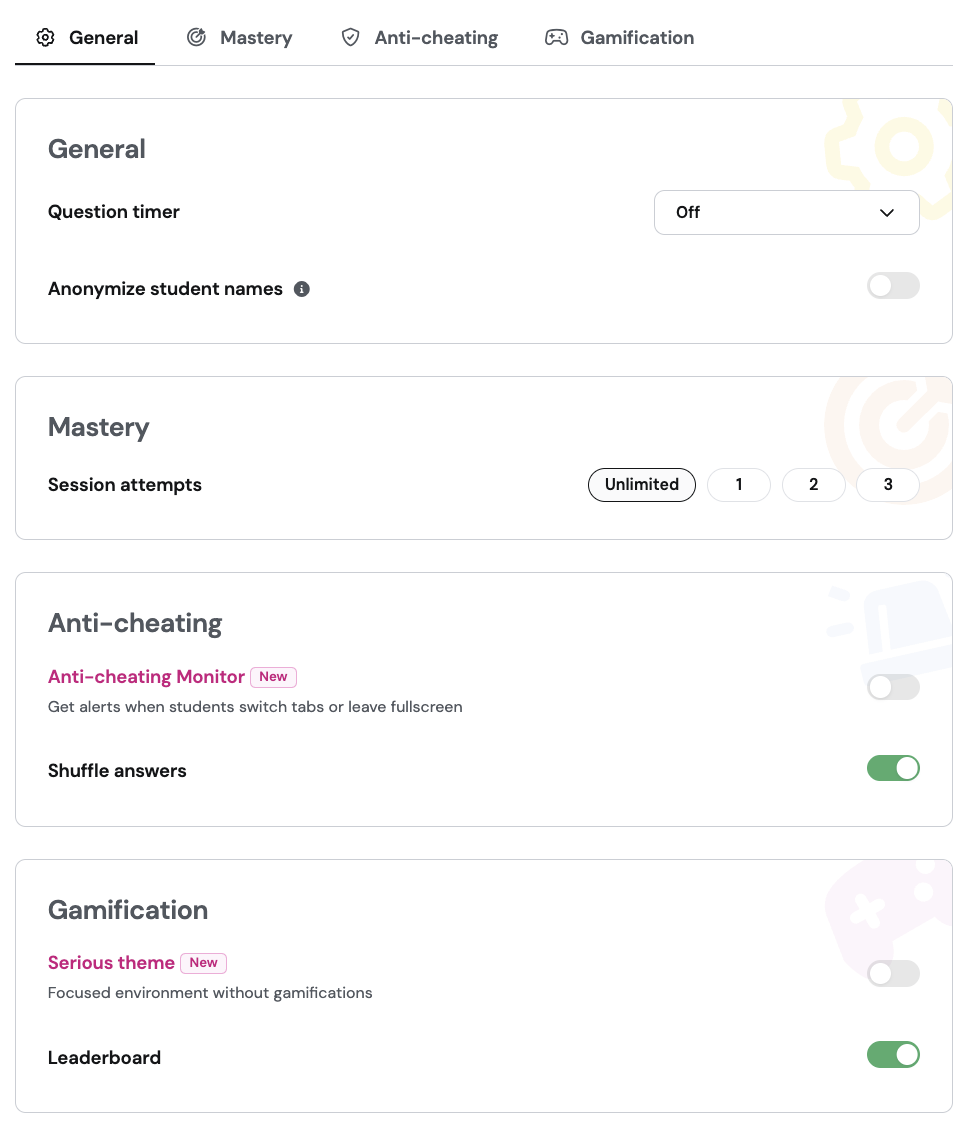
The second factor is the assignment setting, as shown in Figure 3, which appears to be comprehensive for a free version compared to several other interactive presentation platforms. When assigning a self-paced task, teachers can customize several settings to manage learning and monitor progress effectively. The flexibility is useful because it allows the design of tasks that suit different levels of learner independence. The task can be assigned to a specific class, allowing the system to record real student names and track their performance. This helps maintain organization and identify students who may require extra support or encouragement. Integration with Google Classroom, Microsoft Teams, and other platforms is available, along with options to allow late submissions and edit the closing date. These integration features make coordination seamless. As a Google Classroom user for my FC, I can update one system and have it reflected across the other platform for my students to use.
In the general settings, teachers can enable or disable the question timer and choose to anonymize student names. Most of the time, I turn the timer off to reduce pressure during independent work, especially for students who need more time to think. The mastery settings let instructors decide how many attempts students can make for each session. I usually allow at least two attempts so that students can learn from their mistakes and improve, which aligns with my goal of promoting self-regulated learning.
To maintain academic integrity, the anti-cheating monitor can send alerts when students switch tabs or leave fullscreen mode, and answer choices can be shuffled to reduce copying. This feature gives me peace of mind when students work remotely, as it helps ensure fairness and genuine effort. Also, when a student cheats, the system provides a notification that allows the teacher to intervene appropriately, such as issuing a reminder or a warning. Overall, this feature might help address concerns about student cheating during online assignments or examinations (Noorbehbahani, 2022).
Lastly, the gamification setting allows teachers to create either a focused, non-gamified environment using the Serious theme or a more competitive one by activating the Leaderboard feature. I alternate between the two; the Serious theme supports reflection, while the Leaderboard encourages greater engagement.
Figure 3
Wayground’s Assignment Setting
Tracking of Students’ Progress Pre-Class
The third factor is the tracking of students’ progress before the in-class session, an essential process in FC (Kuo et al., 2022; Anggoro & Khasanah, 2022). Wayground slides provides detailed progress tracking and reporting features that help teachers monitor student learning in real time. The centralized dashboard is particularly useful because it eliminates the need to switch between multiple platforms or spreadsheets to monitor student performance. Each assigned activity appears under the Sessions tab, showing essential details such as the task title, start and due dates, and whether late submissions are allowed. This helps manage multiple classes more efficiently, especially when students submit at different times. Also, teachers can invite participants using a join code or a direct link, which makes access simple even for large classes. In my experience, this quick access reduces confusion and saves valuable class time.
Once students begin working, the platform automatically compiles key performance data, including accuracy, completion rate, total number of participants, and number of questions. The summary view is useful because it provides an immediate overview of overall student performance. From the teacher’s dashboard, each student’s performance is displayed clearly, showing accuracy percentage, number of correct and incorrect answers, and points earned. I often review these data to identify students who may require additional support or feedback. The system also flags “off-task activity,” helping teachers identify students who might have been distracted or switched tabs during the task. This is a useful feature for online learning environments, as it supports accountability without requiring continuous manual monitoring.
By contrast, most other interactive platforms’ free versions do not allow access to students’ names or ID numbers, which makes it hard to locate their answers. They also often fail to provide clear progress indicators, such as the percentage of the activity completed. Because of this, I still have to manually check students’ responses to identify trends or understand common problems, which is rather time-consuming. Wayground, on the other hand, automatically compiles and displays this data in a user-friendly way, allowing me to see trends, strengths, and areas for improvement at a glance. Though other platforms are still helpful and have supported my teaching practice, Wayground offers a more efficient workflow for data interpretation and tracking.
Additionally, Wayground slides supports multiple attempts, enabling teachers to evaluate students’ progress across tries and promote mastery learning. As previously mentioned, I like allowing second attempts because it gives students a chance to reflect and try again, something I believe strengthens self-regulation and resilience. Teachers can sort the results by various criteria, such as accuracy, score, or number of attempts, and even share reports with parents or colleagues through the platform, if necessary. This saves me hours of report preparation, especially when I need to present progress data during quality assurance meetings in my department. Overall, Wayground slides turns what could be a tedious grading process into a transparent, data-driven reflection of students’ learning progress. It may be similar to having a smart assistant who helps me see the story behind the scores, making teaching not just easier, but more insightful.
Animation, Sounds, and Others
The last factor is the animation, sounds, and other small details. Wayground allows a gamification option with various animations and sound effects. At first, I did not think these small features would be particularly influential, especially for students working on self-paced tasks at home, but I quickly realized they might contribute to sustaining student motivation even in the absence of direct teacher supervision. The playful visuals and sound effects may help create an engaging environment that encourages students to stay focused and complete their tasks. While I do not observe them directly, the progress tracking and completion data show higher engagement when these features are enabled. In particular, slide assignments that incorporate gamification often show a higher completion rate than those using the Serious theme. This observation aligns with the findings of Hey et al. (2024), who reported that student engagement is a key factor consistently predicting the use of various learning strategies and self-reported academic achievement, underscoring its role in supporting effective SRL among undergraduate students. Several other interactive presentation platforms either lack these gamified features entirely or offer only limited options. I have tried a few where you either get full gamification or none at all. This restricts flexibility in adapting tools to specific pedagogical goals.
Overall, these options show how Wayground balances fun and function, letting teachers create engaging lessons that work both for self-paced learning at home and in face-to-face classrooms. This balance enhances my confidence that students remain motivated and engaged, whether I see them in person or track them remotely.
Why it Matters in the EFL Context
As I briefly mentioned, in the EFL context, students’ opportunities to use or be exposed to the target language might often be limited (Manabe et al., 2021; Sayer & Ban, 2014). Students are surrounded primarily by their first language, and the most significant opportunities for language learning usually come from inside the classroom, which typically lasts only two hours per week. This is why FC may be particularly impactful in such contexts. The pre-class tasks in FC transform the learning process by extending language exposure and practice beyond the two-hour class. A well-designed and executed pre-class task allows students to engage with the content ahead of time, making face-to-face sessions more focused on review, targeted practice, and deeper skill development. In skills-based courses, this approach ensures that in-class time is maximized for meaningful practice.
Wayground slides is one platform that supports the effectiveness and efficiency of skills-based courses. For example, in writing or speaking courses, if students have already learned key content—such as rules, expressions, or theoretical concepts—before class, and if the teacher can track their progress and identify difficulties beforehand, the limited in-class time can be used more strategically. Teachers can address specific challenges, provide targeted practice, and support students who need extra guidance, thereby increasing the likelihood of successful learning outcomes.
Beyond skills-based courses, I have also used Wayground slides in applied linguistics courses, such as Syntax and Morphology, for pre-service English teachers. In these courses, students tend to focus on how the content will help them in their future teaching, so I emphasize practical applications of the concepts. Wayground allows my students to access presentations prior to class and engage with the material through guided questions. This preparation enables in-class sessions to focus on review, practice, and real-life application, specifically how students can apply the concepts in their teaching or in their own use of English. It may help bridge the gap between theory and practice.
This experience demonstrates the flexibility of Wayground slides across different types of courses. Even using only the free version, the platform’s affordances—AI-generated questions, assignment tracking, progress reporting, and interactive features—make the learning process streamlined, efficient, and meaningful for both students and teachers.
Other Potential Uses of Wayground Slides for SRL
Anggoro and Pratiwi (2023) highlighted how interactive quizzes on Quizizz, a former name of Wayground, can promote self-assessment for both students and teachers. Similarly, Wayground slides may offer comparable affordances for self-assessment. For instance, a student can upload lecture slides from courses they are taking or that have been shared by their professors and use the platform to generate questions in various formats. The student can then go through the slides, answer the questions, and engage in self-assessment.
Teachers can also benefit in the same way. When learning new content or reskilling, instructors can upload materials or slides to the platform and use it to generate self-assessment activities for themselves. Compared to quizzes, slides may offer even greater advantages because of the four types of tasks available, as highlighted earlier: Teach, Review, Practice, and Other. Each task type generates different kinds of questions, providing more varied and meaningful opportunities for reflection and learning. While generative AI platforms such as ChatGPT, Gemini AI, and Copilot AI can also generate questions and facilitate self-assessment, Wayground provides a unique experience through its interactive design features, including animations and sound effects. For individuals who are motivated by visual and auditory stimuli, these interactive features may enhance engagement and make the self-assessment process more enjoyable (Cao et al., 2025).
Expectations for the Future
As an EFL instructor using the FC and recognizing the importance of SRL, I appreciate that Wayground slides supports various types of questions and answers. However, to facilitate more effective pre-class speaking tasks, I need a platform that allows students to upload audio or video recordings. This would enable students to practice speaking before class. A potentially valuable addition would be the incorporation of automatic transcription and automated performance scoring. I realize this may be ambitious, especially for a free version, but such features would further enhance the instructional process. Also, this functionality would not only benefit EFL courses, but could also extend to other skills-based courses or even subjects beyond language learning. Students could practice speaking on topics related to the class or theoretical concepts, helping them develop public speaking skills and potentially boosting their confidence.
At the moment, for students’ pre-class speaking tasks, I still rely on other platforms, typically an LMS such as Google Classroom or social media platforms like Facebook Group, where students can upload videos. Seeing how Wayground is already focused on streamlining the user experience for both teachers and students, I hope to see this type of functionality integrated in the future. It would further improve efficiency and effectiveness in the FC and SRL implementation.
Conclusion
In this article, I have shared my personal experiences using Wayground slides in my EFL courses that integrate FC, where SRL is paramount. Having used FC since 2017 and interactive slides since 2020 during the pandemic, I was notably struck by the increased efficiency of my practice when I started using Wayground slides. As of October 2025, it is the most effective platform I have used for interactive presentations designed for students’ self-paced learning.
The platform reduces my workload in preparation while still giving me full control to assess AI-generated questions in various formats and make adjustments. Tracking student progress is much faster because I no longer have to manually locate their answers or identify common challenges. I can adjust the style of the tasks to be more formal or gamified, and I can monitor whether students complete the tasks independently or whether they may be seeking external assistance when navigating away from the platform. For larger courses, I do not need to worry about generating multiple links, as Wayground can accommodate a bigger number of students. All of these features are available in the free version, suggesting that the paid version could be even more advanced in functionality. I hope the platform continues to offer these features for free or improves them further in the future.
My reflections are limited to my personal experiences with the platform. Prior to adopting Wayground slides, I had experience with other interactive slide platforms. Consequently, first-time users may encounter challenges that were not observed in my experience. Additionally, I operate in a specific context, EFL courses, and I use Wayground primarily to enhance pre-class FC assignments. Therefore, my observations may not apply to other contexts. Nevertheless, I hope that this discussion generates interest among readers, scholars, and researchers to study Wayground slides further, whether in EFL or other educational contexts. Experimental studies or ethnographic research could provide deeper insights into the platform’s potential and its impact on teaching and learning.
Notes on the Contributor
Kiki Juli Anggoro is an Assistant Professor at the School of Education at Walailak University, Thailand. He holds a B.Ed. in English Language Teaching from Yogyakarta State University, Indonesia, as well as an M.Ed. and Ph.D. in Educational Technology and Communications from Naresuan University, Thailand. His research interests focus on technology-enhanced language learning (TELL), flipped classrooms, self-regulated learning, gamification, interactive response systems, and the integration of generative AI in English as a Foreign Language (EFL) instruction.
References
Anggoro, K. J., & Pratiwi, D. I. (2023). Fostering self-assessment in English learning with a generative AI platform: A case of Quizizz AI. Studies in Self-Access Learning Journal, 14(4), 489–501. https://doi.org/10.37237/140406
Anggoro, K. J., & Khasanah, U. (2025). Nearpod interactive video as an independent learning tool in a flipped writing course in a Thai university. Computer-Assisted Language Learning Electronic Journal, 26(1), 21-40. https://doi.org/10.54855/callej.252612
Anggoro, K. J., & Khasanah, U. (2024). Technology-infused teams-games-tournaments in English language class: A mixed method study on students’ achievement and perception. Research in Learning Technology, 32, 3150. https://doi.org/10.25304/rlt.v32.3150
Bergmann, J., & Sams, A. (2012). Flip your classroom: Reach every student in every class every day. International Society for Technology in Education. https://l1nq.com/1da2zse
Cao, Y., Yan, Z., Yang, L., Panadero, E., & Chen, C. (2025). Technology-mediated self-assessment in higher education: A critical review. Contemporary Educational Technology, 17(3), 588. https://doi.org/10.30935/cedtech/16739
Fischer, K., Sullivan, A. M., Cohen, A., King, R. W., Cockrill, B. A., & Besche, H. C. (2023). Using cognitive load theory to evaluate and improve preparatory materials and study time for the flipped classroom. BMC Medical Education, 23(1). https://doi.org/10.1186/s12909-023-04325-x
Hey, R., McDaniel, M. & Hodis, F. A. How undergraduate students learn: Uncovering interrelationships between factors that support self-regulated learning and strategy use. Metacognition Learning 19, 743–772 (2024). https://doi.org/10.1007/s11409-024-09389-8
Khasanah, U., & Anggoro, K. J. (2022). Accessible flipped classroom model for pronunciation instruction: Its effectiveness and students’ perception. International Journal of Instruction, 15(1), 185-196. https://e-iji.net/ats/index.php/pub/article/view/441
Kuo, Y. C., Lin, Y. H., Wang, T. H., Lin, H. C. K., Chen, J. I., & Huang, Y. M. (2022). Student learning effect using flipped classroom with WPSA learning mode – An Example of Programming Design Course. Innovations in Education and Teaching International, 60(6), 824–835. https://doi.org/10.1080/14703297.2022.2086150
Li, S., He, J., Tao, Y., & Liu, X. (2022). The effects of flipped classroom approach in EFL teaching: Can we strategically use the flipped method to acquire communicative competence? Language Teaching Research, 29(3), 1165-1188. https://doi.org/10.1177/13621688221081575
Manabe, K., Hwang, W. Y., & Chuang, Y. W. (2021). English learning enhanced by collaborative contextual drama in an authentic context. Interactive Learning Environments, 31(7), 4490–4506. https://doi.org/10.1080/10494820.2021.1972321
Morita, A., & Fukuya, I. (2023). Impact of decorative pictures in learning materials: The effect of attention‐grabbing features. Applied Cognitive Psychology, 37(6), 1352–1365. https://doi.org/10.1002/acp.4128
Noorbehbahani, F., Mohammadi, A., & Aminazadeh, M. (2022). A systematic review of research on cheating in online exams from 2010 to 2021. Education and Information Technologies, 27(6), 8413–8460. https://doi.org/10.1007/s10639-022-10927-7
Sayer, P., & Ban, R. (2014). Young EFL students’ engagements with English outside the classroom. Elt Journal, 68(3), 321–329. https://doi.org/10.1093/ELT/CCU013
Walsh, J. N. (2024). Using cluster analysis to identify procrastination and student learning strategies in a flipped classroom. The International Journal of Management Education, 22(1). https://doi.org/10.1016/j.ijme.2024.100936